
Developer Tools
How to Generate a GUID Online
Generate random UUID v4 GUIDs online with UseBoldTools: choose count, format output, copy values, or download TXT and CSV files from your browser.
By UseBoldTools Team 7 min readPublished June 3, 2026
Introduction
A GUID, also called a UUID, is one of those small developer utilities you often need in the middle of a larger task: creating test records, naming temporary files, adding request IDs, or preparing seed data for a database. The free GUID Generator on UseBoldTools is built for that moment. It opens directly in the browser, generates a UUID v4 immediately, and gives you controls for count, format, copy, clear, and file download.
This guide explains how to generate GUIDs online with the UseBoldTools workflow, when to use UUID v4, which output format to pick, and what mistakes to avoid. If you are deciding whether the terms GUID and UUID mean different things, keep the GUID vs UUID guide nearby as a companion reference.
For more practical developer utility guides, browse the UseBoldTools blog.
What the GUID Generator does
UseBoldTools GUID Generator creates random UUID v4 identifiers with the browser native crypto.randomUUID() API. UUID v4 is the common random version of the UUID standard. It is useful when you need identifiers that can be generated independently without asking a central database for the next number.
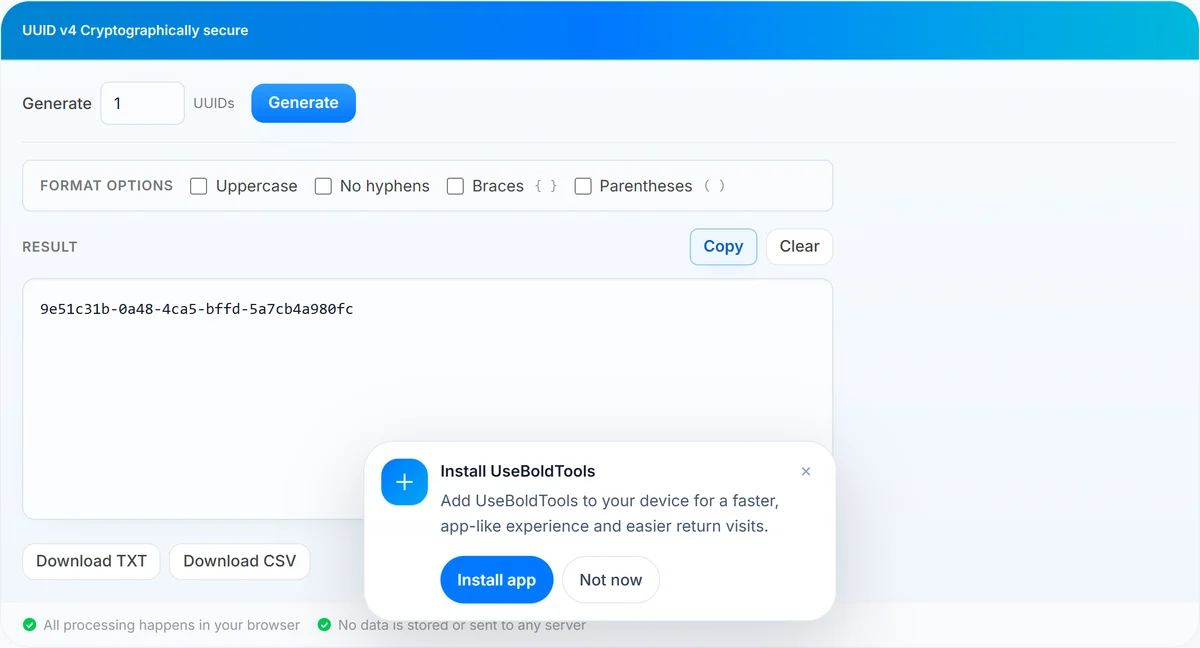
The page is intentionally compact. You enter a count from 1 to 1,000, click Generate, and the output appears in a monospaced result box. By default, the tool also generates one UUID as soon as the page loads, which makes quick copy tasks almost instant.
Format options let you adapt the same generated values for different systems: uppercase, no hyphens, braces, and parentheses. The braces and parentheses options are mutually exclusive wrappers, so the output stays clean rather than stacking two wrapper styles together.
When you need a GUID generator
- Database fixtures. Generate IDs for sample rows, seed scripts, demos, and local development data.
- API and integration testing. Create request IDs, correlation IDs, idempotency keys for non-secret tests, and sample resource identifiers.
- Distributed systems. Prepare identifiers that do not depend on one shared auto-increment sequence.
- File naming. Add a unique suffix to export files, temporary uploads, or generated reports.
- Bug reports and documentation. Paste realistic UUID examples without reusing a production identifier.
If the generated GUIDs will live inside JSON, pair this tool with JSON Formatter so your sample payload stays readable. For token inspection, JWT Decoder is usually the better next step than treating a UUID as a token.
Step-by-step: generate GUIDs online
Open GUID Generator. The tool generates one UUID v4 automatically on page load, so for a single standard GUID you can usually copy the value right away.
- Set the count. Use the Generate field to choose any number from 1 to 1,000. Values outside that range are clamped by the tool logic.
- Click Generate. The tool creates fresh UUID v4 values with crypto.randomUUID() and displays one value per line.
- Choose format options. Toggle Uppercase, No hyphens, Braces, or Parentheses when your target platform expects a specific style.
- Copy or export. Use Copy for the full batch, Download TXT for a plain text list, or Download CSV when you want a spreadsheet-friendly file.
- Clear when finished. Clear removes the current result from the page so you can start a new batch.
Changing format options does not need a new random batch. The tool stores the generated values internally and re-renders them in the selected style, which is useful when you want to compare standard and no-hyphen output for the same set.
Choosing the right GUID format
The safest default is the standard lowercase hyphenated UUID form, such as 550e8400-e29b-41d4-a716-446655440000. It is easy to read, widely accepted, and matches what most developers expect when they say UUID v4.
- Uppercase is common in some Microsoft-heavy environments and older documentation.
- No hyphens is useful when a database column, filename, or legacy field expects exactly 32 hexadecimal characters.
- Braces match formats often seen around Windows registry, COM, and some .NET examples.
- Parentheses appear in a few legacy systems or human-readable examples, but they are less common for storage.
When in doubt, copy one standard UUID into the target system first. Only remove hyphens or add wrappers if the system explicitly requires it.
Benefits of generating GUIDs in the browser
- Fast for everyday tasks. The tool is ready on load and can generate a whole test batch in one click.
- No setup. You do not need a terminal command, package install, database console, or account.
- Batch-friendly. Generate up to 1,000 UUIDs, then copy all or export as TXT or CSV.
- Format control. The same page covers standard UUIDs, uppercase values, compact no-hyphen values, and wrapper styles.
- Private by design. Generated identifiers stay in your browser instead of being submitted to a backend endpoint.
Privacy and security
The GUID Generator runs client-side. It calls crypto.randomUUID() in your browser, stores the generated values in page state, and renders them into the output field. The generated GUIDs are not sent to UseBoldTools servers for generation.
That privacy model is helpful for local development values and non-sensitive identifiers. It does not make a UUID a secret. UUID v4 has strong randomness, but the format is designed for uniqueness, not authentication or access control.
For secrets, API keys, passwords, reset links, and session tokens, use a dedicated security library or platform secret generator. If you need to inspect an existing JWT, open JWT Decoder instead of generating a UUID as a replacement.
Common mistakes to avoid
- Using UUIDs as secrets. UUID v4 values are public identifiers, not passwords or API keys.
- Changing format after pasting elsewhere. If one system stores no-hyphen IDs and another stores hyphenated IDs, normalize them before comparison.
- Mixing example IDs with real production IDs. For docs and bug reports, generate fresh sample values rather than copying a live customer or order ID.
- Assuming UUID v4 sorts by creation time. Random UUIDs do not naturally sort by time; use timestamps or another ID strategy when ordering matters.
- Generating more than you need. A batch of 1,000 is useful for fixtures, but quick manual tasks are easier to review with a smaller count.
Best practices
- Use standard hyphenated UUIDs unless a schema or API contract says otherwise.
- Store UUID columns as a database-native UUID type when your database supports it.
- Keep one UUID per line when exporting fixtures; it makes diffs and reviews easier.
- Document whether your examples use uppercase, no hyphens, braces, or standard form so teammates do not guess.
- Use Hash Generator, Base64 Encoder / Decoder, Timestamp Converter, and JSON Formatter alongside GUID generation when building realistic developer test data.
Conclusion
UseBoldTools GUID Generator keeps GUID generation simple: choose a count, generate UUID v4 values locally, apply the format your system expects, then copy or download the result. It is especially handy for fixtures, documentation, API testing, and quick development tasks where you need unique identifiers without opening a full toolchain.
Open GUID Generator when you need fresh IDs, and read the GUID vs UUID guide if someone on your team is using the two terms differently.
Frequently asked questions
How do I generate a GUID online with UseBoldTools?
Open the GUID Generator, choose how many UUID v4 values you need, click Generate, then copy the result or download it as TXT or CSV.
Can I generate more than one GUID at a time?
Yes. The count input supports 1 to 1,000 GUIDs in one batch. Each generated value appears on its own line.
Are the generated GUIDs sent to UseBoldTools servers?
No. The tool uses the browser crypto.randomUUID() API, and the generated values stay in your browser tab.
Which GUID format should I use?
Use the standard hyphenated lowercase format unless your target system asks for uppercase, no hyphens, braces, or parentheses.
Can I use UUID v4 as a password or API key?
No. UUID v4 is good for public identifiers, test data, database IDs, and correlation IDs. Use a dedicated secret generator for passwords, API keys, or session tokens.
Related guides
Related tools
Ready to try GUID Generator?
Use our free GUID Generator tool in your browser — no account required for most workflows.
Open GUID Generator