
Financial Tools
How to Calculate Personal Loan EMI Before Applying
Calculate personal loan EMI before applying with UseBoldTools: set amount, rate, and tenure, see monthly EMI and total interest instantly, and compare scenarios in your browser.
By UseBoldTools Team 8 min readPublished July 2, 2026
Introduction
A personal loan offer often arrives as a single monthly number—the EMI—without much context about total cost. Before you sign, you need to know whether that payment fits your budget and how much interest you will pay over the full tenure. The free EMI Calculator on UseBoldTools lets you model personal loans in your browser: adjust amount, rate, and years, then see EMI, total interest, and total repayment update instantly.
This guide walks through how to calculate personal loan EMI before applying, using the real UseBoldTools workflow. You will learn which inputs matter, how to read the results panel, when to compare scenarios, and how borrowing decisions connect to broader money planning with tools like the SIP Calculator. Pair this article with EMI vs total interest explained when you want to understand long-term cost, not just the monthly figure.
For more loan and investing guides, browse the UseBoldTools blog.
Personal loan offers vary by lender, credit profile, and purpose—debt consolidation, medical expenses, wedding costs, or home renovation. A single EMI quote from a salesperson rarely includes the total interest you will pay if rates change during negotiation or if you pick a longer tenure for comfort. Modeling scenarios yourself restores control before paperwork begins.
What the EMI Calculator does
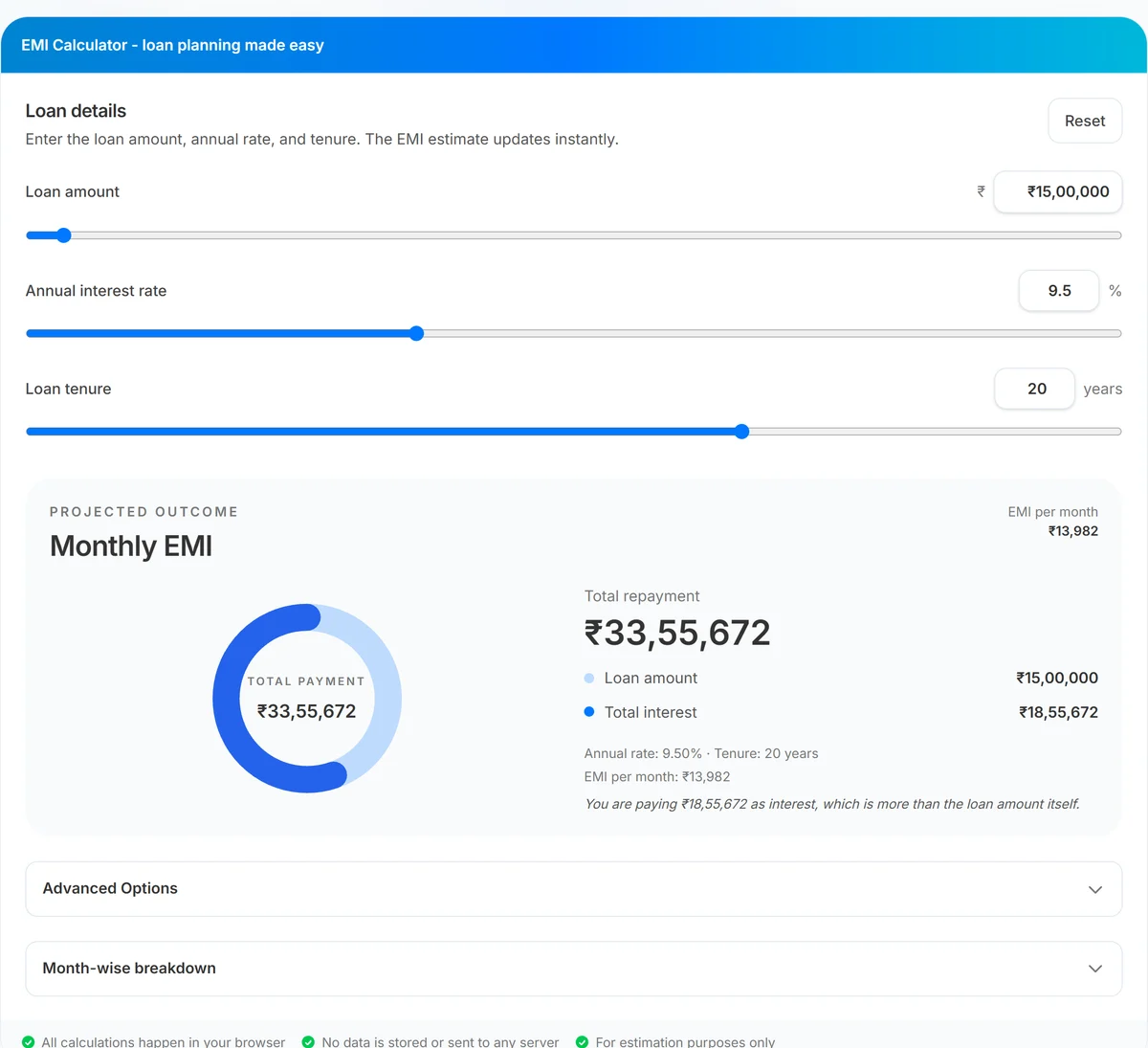
UseBoldTools EMI Calculator estimates Equated Monthly Installment (EMI) for fixed-rate loans. You set three core inputs: loan amount (₹1 lakh to ₹5 crore), annual interest rate (1% to 25%), and tenure in years (1 to 30). Results appear immediately in the Projected outcome panel: monthly EMI, a donut chart splitting principal vs interest, total repayment, and an insight line summarizing interest relative to principal.
Advanced Options expand the model with prepayment simulation—one-time lump sums, recurring extra monthly payments, and per-month overrides in the amortization table. Month-wise breakdown shows principal, interest, extra payments, and remaining balance for every installment, with CSV download when you need a spreadsheet copy.
The standard EMI formula divides repayment into equal monthly installments. Each payment covers that month’s interest on the outstanding balance plus a principal component. Over time, the principal share grows while the interest share shrinks—even though the EMI amount stays constant. That is why the amortization table is valuable: it shows exactly when you start making meaningful principal progress.
The footer confirms that calculations happen locally, no data is sent to a server, and figures are for estimation only. Final lender offers may include processing fees, insurance, or rate changes not captured in a simple EMI formula.
When to calculate EMI before applying
- Comparing lender quotes. Two banks may quote different rates or tenures. Model each scenario to see which truly costs less over time.
- Debt-to-income checks. Lenders often cap EMI as a share of monthly income. Run your expected principal and rate to see if the payment is realistic.
- Tenure trade-offs. A longer loan cuts EMI but raises total interest. Calculate both a 3-year and 5-year personal loan before choosing.
- Consolidation decisions. When merging credit card balances into one personal loan, verify the new EMI and total interest against your current payments.
- Pre-approval planning. Know your comfortable EMI range before sales calls push a higher loan amount.
If you are balancing loan payments with long-term investing, open SIP Calculator to estimate monthly SIP outcomes alongside your EMI. That side-by-side view helps you avoid over-borrowing while still funding goals. Home buyers should also review common home loan mistakes for first-time buyers before scaling up to a mortgage.
Step-by-step: calculate personal loan EMI
Open EMI Calculator. The Loan details section is on the left; projected EMI and totals update on the right as you change inputs.
- Set the loan amount. Drag the loan amount slider or type a value in the ₹ field. For a ₹5 lakh personal loan, enter 500000. The range runs from ₹1,00,000 to ₹5,00,00,000.
- Enter the annual interest rate. Use the rate from your lender’s offer letter or pre-approval email. Adjust the slider or type a decimal such as 11.5%.
- Choose tenure in years. Personal loans commonly run 1 to 5 years, though the tool supports up to 30 years for other loan types. Set the year count that matches your offer.
- Read monthly EMI and totals. The right panel shows EMI per month, total repayment, loan amount, and total interest. The donut chart visualizes how much of your payments go to interest versus principal.
- Review the insight line. Below the chart, a short sentence puts total interest in context—for example, whether interest exceeds half the principal.
- Optional: open Month-wise breakdown. Expand the table to see how principal and interest split each month. Download CSV if you need to share numbers with a co-borrower or financial planner.
When comparing two personal loan offers, change one variable at a time. First hold tenure constant and compare rates; then hold rate constant and compare tenure. This disciplined approach prevents confusion when a lower EMI comes from a longer loan rather than a better rate. Write down all three outputs—EMI, total interest, and total payment—for each scenario you test.
Benefits of calculating EMI before you apply
- No signup required. Open the page, enter numbers, and get results without creating an account.
- Instant feedback. Sliders and inputs recalculate EMI immediately—no waiting on server round trips.
- Total cost visibility. Monthly EMI alone can hide expensive interest. The tool surfaces total interest and total repayment beside the EMI.
- Scenario comparison. Change tenure or rate in seconds to compare offers without rebuilding spreadsheets.
- Amortization detail. Month-wise breakdown shows how much principal you repay early vs late in the loan.
- Prepayment preview. Advanced Options let you test lump-sum or extra monthly payments before you commit extra cash.
Privacy and security
The EMI Calculator runs entirely in your browser. Loan amounts, interest rates, and tenure values are not uploaded, stored, or transmitted to UseBoldTools servers for calculation. That matters when you model real salary, existing debt, or pre-approval figures on a work or shared computer.
Downloaded CSV amortization files stay on your device. Clear your downloads folder on shared machines if the export contains sensitive planning data. The tool is for estimation—always confirm final numbers with your lender’s sanction letter.
UseBoldTools does not pull credit reports or verify income. Nothing you enter affects your credit score or loan eligibility with any bank.
Common mistakes before applying
- Focusing only on EMI. A manageable monthly payment can still carry high total interest. Always check the total repayment line.
- Using the wrong rate type. Enter the annual interest rate, not the monthly rate. The calculator converts annual to monthly internally.
- Ignoring fees. Processing fees, insurance add-ons, and GST on fees are not included in basic EMI. Ask the lender for all-in cost.
- Maxing tenure for convenience. Stretching a personal loan to the longest allowed tenure lowers EMI but increases interest substantially.
- Skipping prepayment math. If you expect a bonus, model prepayment savings with Advanced Options instead of assuming base EMI is final.
- Comparing unlike tenures. A lower EMI at 5 years vs 3 years is not apples-to-apples unless total interest is compared too.
Read EMI vs total interest explained for a deeper look at why total interest often surprises first-time borrowers, especially on longer tenures.
Best practices for personal loan planning
- Model the exact principal you need—not the maximum pre-approved amount—unless you have a disciplined use for the difference.
- Run at least two tenure scenarios (shorter vs longer) and compare total interest, not just EMI.
- Keep total EMI obligations—including existing home, car, or card payments—below a comfortable share of net monthly income.
- If investing simultaneously, balance loan cost against expected returns using the SIP Calculator for your monthly surplus.
- Save or screenshot CSV breakdowns when discussing options with a co-applicant or advisor.
- Re-run calculations when a lender revises rate after negotiation—small rate drops compound over the full tenure.
Explore more calculators in the financial tools category, including SIP Calculator for wealth-building projections alongside debt planning.
Conclusion
Calculating personal loan EMI before you apply turns a marketing headline into a full picture: monthly cash flow, total interest, and repayment timeline. UseBoldTools EMI Calculator makes that check fast, private, and repeatable as you compare lenders or tenures.
Open EMI Calculator with your latest quote, then read EMI vs total interest explained and how prepayments reduce loan interest when you are ready to optimize total cost—not just the monthly installment.
Frequently asked questions
How do I calculate personal loan EMI before applying?
Enter the loan amount you plan to borrow, the annual interest rate quoted by the lender, and the tenure in years. The EMI Calculator shows monthly EMI, total interest, and total repayment instantly as you adjust sliders or type values.
What loan amount range does the calculator support?
You can model amounts from ₹1,00,000 up to ₹5,00,00,000 using the loan amount slider or the currency input field. Values outside that range are clamped to the supported limits.
Does a lower EMI always mean a cheaper loan?
Not necessarily. A longer tenure lowers the monthly EMI but often increases total interest paid over the life of the loan. Compare both monthly EMI and total interest before you apply.
Can I use this for home or car loans too?
Yes. The same EMI formula applies to any fixed-rate installment loan. Enter your principal, annual rate, and tenure. For large home loans, also read our guide on common first-time buyer mistakes.
Is my loan data stored when I use the calculator?
No. All calculations run in your browser. Loan amounts, rates, and tenure are not uploaded or saved on UseBoldTools servers.
Related guides
EMI vs Total Interest: How to Understand Your Loan Cost
Understand EMI vs total interest with UseBoldTools: see monthly EMI, total interest, donut chart split, and amortization so you know the true cost of your loan.
How Prepayments Can Reduce Your Loan Interest
See how prepayments reduce loan interest with UseBoldTools: simulate lump sums and extra monthly payments, view interest saved, tenure reduced, and month-wise breakdown locally.
Common Home Loan Mistakes First-Time Buyers Make
Avoid common home loan mistakes as a first-time buyer: model EMI and total interest with UseBoldTools, compare tenure, plan prepayments, and balance investing with SIP.
Related tools
Ready to try EMI Calculator?
Use our free EMI Calculator tool in your browser — no account required for most workflows.
Open EMI Calculator